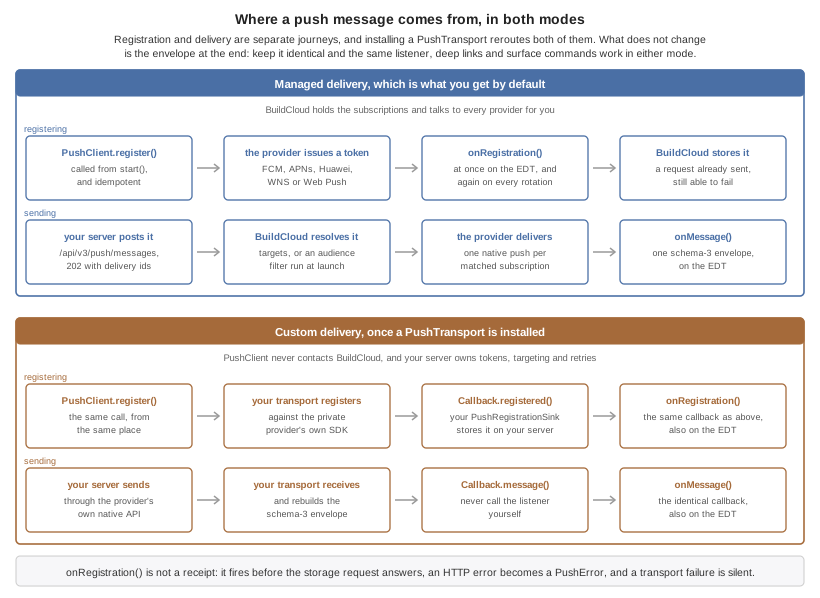
For new integrations, Codename One push uses a typed message envelope and an explicit client binding. Your main application class doesn’t implement a push interface. Existing applications using PushCallback can keep that integration; see Migrate an existing push server before changing their payload format. The same application code receives messages from Android, iOS, Huawei devices, and supported web browsers.
You can use the managed BuildCloud service or install an adapter for custom native push. A custom-provider adapter is a low-level escape hatch: it bypasses BuildCloud registration and delivery completely, so your server owns tokens, credentials, targeting, retries, and provider errors.
That choice reroutes both halves of the journey, registration and delivery, and leaves the application code alone. The rest of this chapter fills in each box.
Create and configure an application
Open the Codename One Console in the organization that owns the application. Create one Push application for each logical application and environment. Keep production and staging separate so credentials, audiences, and analytics remain isolated.
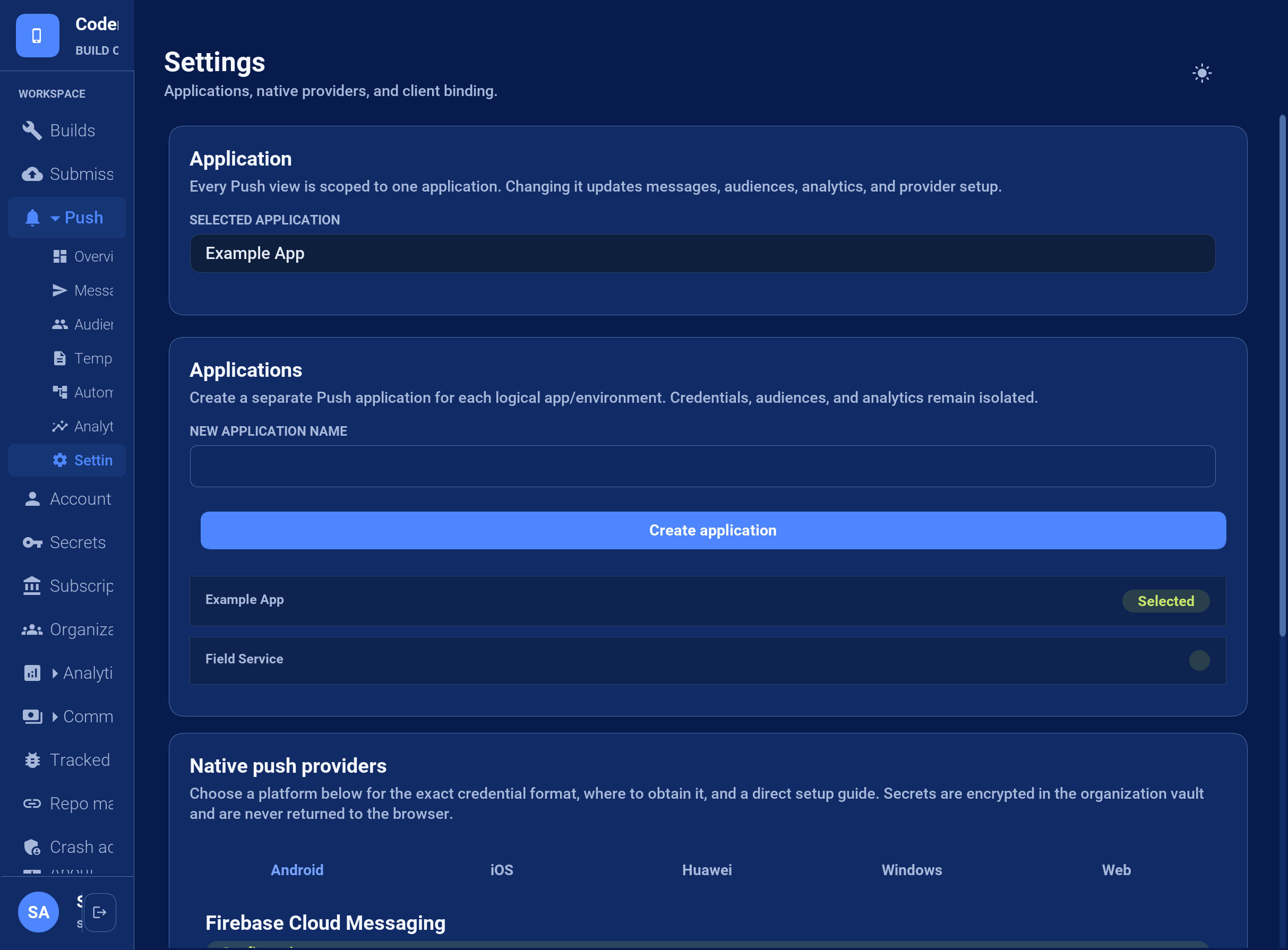
Open Push > Settings. Enter a name under Applications and select Create application.
Use the Selected application picker at the top of the Push page to select that application. Settings can also list applications registered by the classic API. If the application isn’t among those loaded, use Load more in Settings, then return to the picker.
Open the Android or iOS provider tab under Native push providers, paste the credential JSON described below, and save it.
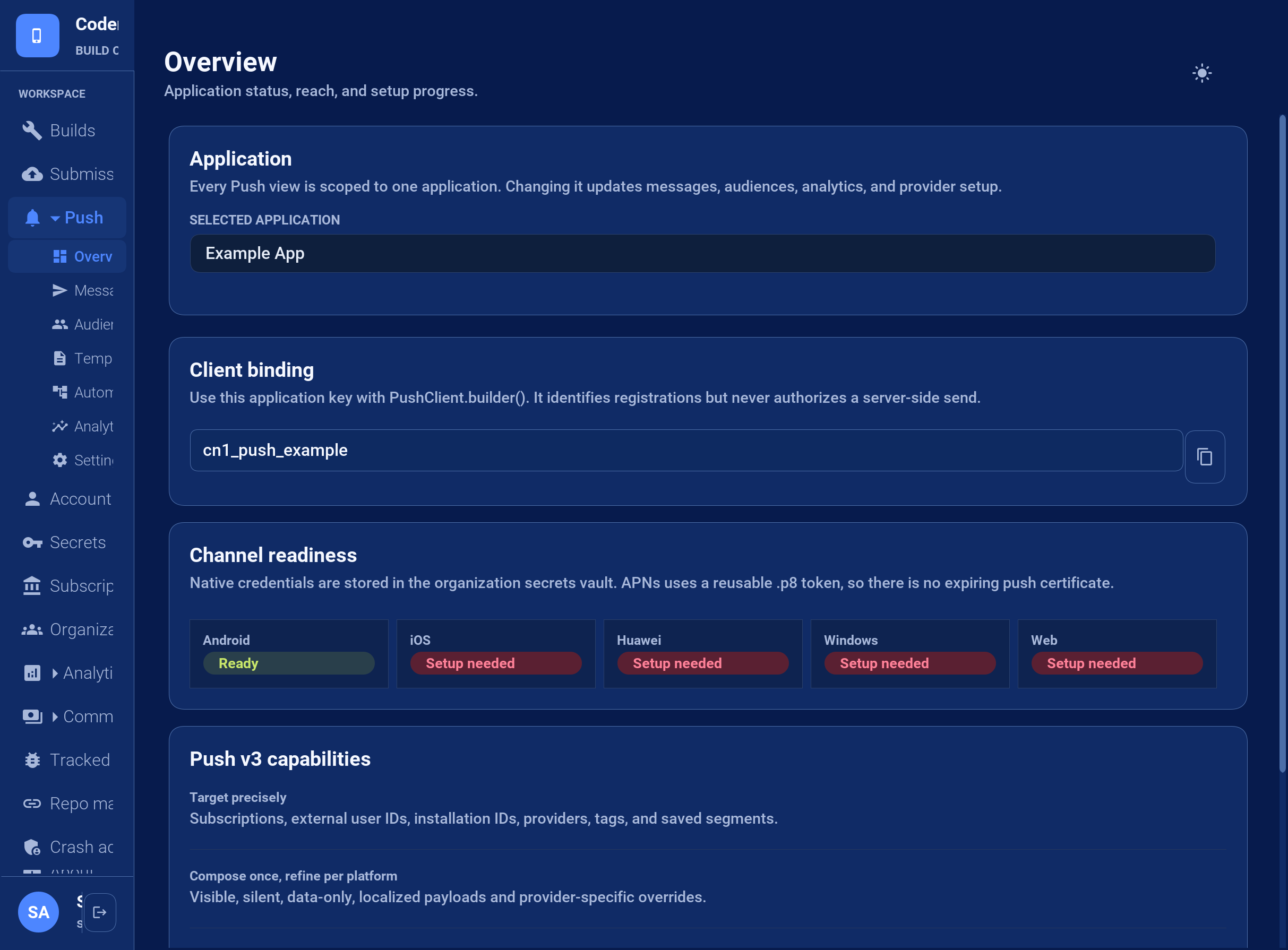
Check Configured in Settings or Ready under Push > Overview > Channel readiness for the same selected application. These labels mean a credential is stored; a real test send is still needed to verify provider authentication and device delivery.
Use the following identifiers for their separate purposes:
| Value | Where to find it | Where to use it |
|---|---|---|
Application UUID | Push > Overview > Server API > Copy ID | The |
Client binding key | Push > Overview > Client binding |
|
Server API key | Account > Server API keys |
|
Select any readiness card, including a green Ready card, to open Settings on that provider’s tab.
Android: Firebase service-account JSON
In the Firebase project used by the installed Android app, open Project settings > Service accounts and select Generate new private key.
Open the downloaded service-account JSON file locally and copy the complete JSON object.
In Push > Settings > Native push providers > Android, paste it into Credential JSON and select Save Firebase Cloud Messaging credential.
The server credential contains project_id, client_email, and private_key. Android’s google-services.json configures the mobile app and can’t authenticate server sends. Keep the service-account private key on the server; don’t bundle it into the app or paste it into a support thread.
iOS: APNs key and credential JSON
Create an APNs authentication key in Apple Developer Certificates, Identifiers & Profiles. Download its .p8 file and note the key ID and your Apple team ID. Use the bundle ID of the installed app as topic.
The Console’s Credential JSON field expects a JSON object containing those values. It doesn’t accept the raw .p8 file by itself. Replace the placeholders in this example:
{
  "teamId": "YOUR_APPLE_TEAM_ID",
  "keyId": "YOUR_APNS_KEY_ID",
  "topic": "com.example.app",
  "environment": "production",
  "privateKey": "-----BEGIN PRIVATE KEY-----\nYOUR_COMPLETE_P8_KEY_CONTENTS\n-----END PRIVATE KEY-----\n"
}
privateKey contains the entire .p8 text, including the BEGIN/END lines. Within the JSON string, encode each line break as \n; literal line breaks inside a quoted JSON value are invalid. Use environment: "production" for App Store and TestFlight installations, and "sandbox" for development-signed installations. The bundle ID, Apple team, environment, and device token must belong to the same app installation.
In Push > Settings > Native push providers > iOS, paste the completed object and select Save Apple Push Notification service credential. Token authentication uses the APNs signing key instead of an expiring push certificate.
Other providers and saved status
Huawei: save the AppGallery Connect application ID and client secret. Add
agconnect-services.jsonto the project.Windows / WNS: save the Package SID and client secret associated with the Store identity.
Web Push: save the VAPID public and private keys and subject.
The managed backend includes WNS delivery for explicit Windows targets. It doesn’t revive or generate bindings for the unsupported UWP port.
Credentials are encrypted in the BuildCloud secrets vault and are write-only. The input is cleared after saving and stays blank when you return to the page. Check the saved-status label for the same selected application instead of expecting the secret to reappear. If the status says Not configured or Status unavailable, check the selected application and organization and report any error. Rotate a credential by saving its replacement.
Prepare a new client build
Cloud builds detect PushClient usage and generate the typed native bootstrap automatically. On Android, include google-services.json, agconnect-services.json, or both. A build with both configurations uses FCM when Google Play Services are available on the device and falls back to Huawei Push Kit otherwise. No provider-selection build hint is required. The android.messagingService=fcm and android.messagingService=huawei hints remain available only when an application intentionally needs to force one provider.
iOS enables push support automatically when PushClient is referenced; set ios.includePush=false only when an installed custom-provider adapter intentionally owns registration.
The Console displays an application key. This key identifies an application during device registration; it isn’t a server API key and doesn’t authorize sending messages. Keep send API keys on your server.
Bind the client
Create one PushClient in init(), retain it in a field on the main application class, and call register() from start() after showing any permission rationale required by your UX:
private PushClient push;

public void init(Object context) {
    push = PushClient.builder("cn1_push_application_key")
            .listener(new PushListener() {
                @Override
                public void onRegistration(PushSubscription subscription) {
                    Log.p("Push ready on " + subscription.getTransportId());
                }

                @Override
                public void onMessage(PushMessage message) {
                    if (message.getDeepLink() != null) {
                        Log.p("Route to " + message.getDeepLink());
                    }
                }

                @Override
                public void onError(PushError error) {
                    Log.p(error.getCode() + ": " + error.getMessage());
                }
            })
            .build();
}

public void start() {
    push.register();
}

public void stop() {
    // Keep the subscription and listener active while the app is paused.
}

public void disableNotifications() {
    // Use only for an explicit user opt-out.
    push.unregister();
}
start() can run more than once during one process lifetime. register() is idempotent, so the example can call it on every start without creating duplicate native registrations. Don’t call unregister() from stop(): it removes the device subscription. Call it only for an explicit user opt-out or account-removal workflow.
Registration is asynchronous. With managed delivery, the framework registers the native token with BuildCloud automatically. PushSubscription exposes the transport identifier, opaque native token, platform, installation ID, expiry, and capability list for diagnostics. Application code shouldn’t parse the token or use it as a user identity.
On Android, the native bootstrap can obtain and persist an FCM or Huawei token before start() installs the PushClient callback. register() replays that persisted token after activating the listener and then asks the provider to refresh it, so the documented init()/start() lifecycle doesn’t lose early registration.
Listener lifecycle and early messages
PushClient.Builder.listener() is mandatory, and build() fails immediately if it’s missing. The client retains that listener until deregistration completes. Codename One doesn’t locate listeners with reflection or Class.forName(): the application must build, retain, and register the client explicitly. Only one PushClient can be active in a process; a second client reports an active_client error instead of replacing the first listener.
Every PushListener and PushRegistrationSink callback runs on the Codename One EDT:
onRegistration()runs after initial native registration and can run again when a provider rotates its token. Replace the previous server-side token for that installation.onMessage()receives one parsed schema-3 envelope. A foreground notification can arrive immediately. A visible background notification normally arrives after the user opens it.onError()reports registration and envelope errors. UsePushError.getCode()for decisions; diagnostic text isn’t a stable contract.
Native ports preserve a cold-start notification until the runtime can deliver it. If the runtime starts before the application calls register(), PushClient keeps a bounded process-local queue and replays it after activation. If the application never registers its client, it has provided no listener and can’t expect application callbacks. Silent/background execution remains subject to each OS’s power and scheduling rules, so refresh authoritative state whenever the application resumes.
Build a message
PushMessage is the canonical message model on both sides of the wire:
PushMessage message = PushMessage.builder()
        .title("Order shipped")
        .body("Order 4815 is on its way")
        .deepLink("myapp://orders/4815")
        .imageUrl("https://example.com/orders/4815.png")
        .collapseKey("order-4815")
        .ttlSeconds(3600)
        .data("orderId", "4815")
        .build();
Common fields have consistent meanings on every provider. Add provider-specific settings under the platform object only when the common model isn’t sufficient. Unknown settings are ignored by unrelated providers.
{
  "schema": 3,
  "title": "Order shipped",
  "body": "Order 4815 is on its way",
  "deepLink": "myapp://orders/4815",
  "collapseKey": "order-4815",
  "ttl": 3600,
  "data": { "orderId": "4815" },
  "platform": {
    "apns": { "badge": 3, "sound": "default", "interruptionLevel": "time-sensitive" },
    "fcm": { "channelId": "orders", "priority": "high" },
    "huawei": { "channelId": "orders", "importance": "HIGH" },
    "wns": { "type": "toast" },
    "web": { "urgency": "high" }
  }
}
Don’t place secrets or irreplaceable data in a notification. Providers, operating systems, and lock-screen UI may retain or expose payloads.
Send from a server
Open Account > Server API keys, enter a key name, select the push scope, and select Create server key. Copy the key when it’s shown; it won’t be displayed again. Keep it on your server. Authenticate with Authorization: Bearer YOUR_SERVER_API_KEY or X-API-Key: YOUR_SERVER_API_KEY; the existing classic push token won’t authenticate V3 requests.
Copy the selected application’s UUID from Push > Overview > Server API > Copy ID. Put that UUID in appId, then submit a typed message and one or more provider targets to POST /api/v3/push/messages:
curl -X POST https://cloud.codenameone.com/api/v3/push/messages \
  -H 'Authorization: Bearer YOUR_SERVER_API_KEY' \
  -H 'Content-Type: application/json' \
  -d '{
    "appId": "APPLICATION_ID",
    "targets": [
      {"provider":"fcm", "token":"OPAQUE_DEVICE_TOKEN"},
      {"provider":"apns", "token":"OPAQUE_DEVICE_TOKEN"}
    ],
    "message": {
      "schema":3,
      "title":"Order shipped",
      "body":"Order 4815 is on its way",
      "data":{"orderId":"4815"}
    }
  }'
A successful admission returns HTTP 202 with durable delivery IDs. Invalid targets are deactivated when the provider identifies them as permanent failures.
The complete request, response, authentication, error, target, and message schemas are in the Push sending OpenAPI 3.0 specification. Import that file into Swagger UI, an OpenAPI code generator, or an API client instead of reproducing DTOs from this chapter.
Use the Console for operator-driven messages, stored audiences, campaigns, analytics, and automations.
Migrate an existing push server
There are two migration paths. Choose one wire format for each request:
| Path | Endpoint and request | Authentication and installed apps |
|---|---|---|
Keep the classic API |
| Keep the classic |
Move the server to V3 |
| Use a server API key with |
For the classic path, change only the host of the existing /push/push URL. Keep fields such as token, device, type, body, auth, cert, certPassword, and production. Don’t post these form fields to /api/v3/push/messages. A Java URL string must contain the plain URL, without Markdown brackets or parentheses.
For a server-only V3 migration, configure credentials for the same Firebase project and Apple bundle ID/environment as the installed apps. Keep existing device keys and select the explicit classic payload:
{
  "appId": "YOUR_APPLICATION_UUID",
  "targets": [
    {"provider": "fcm", "token": "cn1-fcm-YOUR_ANDROID_DEVICE_TOKEN"},
    {"provider": "apns", "token": "cn1-ios-YOUR_IOS_DEVICE_TOKEN"}
  ],
  "message": {
    "schema": 3,
    "classic": {"type": 1, "body": "Hello"}
  }
}
Send this JSON with the same headers as the V3 curl example above. Replace each target with a real device key for that provider. Existing cn1-fcm-, cn1-gcm-, and cn1-ios- prefixes are accepted. Keep the numeric push type and body encoding used by your existing sender; the example uses type 1 for a simple message.
message.classic produces the fields consumed by installed PushCallback clients. It doesn’t require platform.fcm/platform.apns overrides, a PushClient integration, or a new mobile release. Don’t combine classic with the ordinary V3 message fields. Use ordinary V3 messages for clients that have adopted PushClient.
Before changing production traffic, send to installed Android and iOS test apps. Verify foreground delivery, background delivery, notification taps, and any other push types your application uses.
Interpret the response
HTTP 202 means the request was admitted to the durable queue. Its JSON response contains deliveryIds and quota; it doesn’t mean the provider or device has accepted the message yet. Use delivery feedback and analytics for later outcomes.
401: check the server API key, its
pushscope, and the authentication header. A classic push token or client binding key isn’t a V3 server key.400: read the JSON error, check that
appIdis the selected application UUID, and check the request or credential format. For the classic endpoint,credential URL returned HTTP 404means a URL supplied inauthorcertcouldn’t be fetched. Firebaseauthcan also contain the complete service-account JSON directly.406 after a notification arrives: this isn’t a successful API response, and changing the message format or resending can duplicate the notification. Report the UTC request time, endpoint, response body, and
CF-RAYheader when present, without including credentials or device tokens. The expected successful V3 response remains202with delivery IDs.
Learn which sends failed
A notification is acknowledged when it’s admitted, not when it arrives. Both
wire APIs
answer before any provider has been asked — the classic endpoint replies
queued — so the verdict lands seconds later, after your request has already
returned. Nothing in the response can tell you that a device key is dead, and
a dead key stays in your database being sent to.
Delivery feedback closes that. Configure an HTTPS endpoint and BuildCloud posts a signed digest of the outcomes since the last one, once a day. It’s available on Pro and above, and it’s configured per organization rather than per application: callers on the classic API register an application per send, so there is nothing stable there to attach a setting to.
Open Push > Settings > Delivery feedback, enter the endpoint, enable the daily digest, and select Send test event. The test posts one synthetic event through the same signing and sending path as a real digest and reports what your endpoint answered, so a broken receiver is visible immediately rather than a day later. The signing secret is on the same card.
What arrives
Failures are itemized and successes are counted. A busy application produces thousands of accepted deliveries a day and nothing can be done about any of them, so listing them would bury the handful of events that matter.
{
  "version": 1,
  "organization": "9f1c2f7a-2f6e-4a5b-9d71-3f0a7c1d5e22",
  "generatedAt": 1790179200000,
  "window": {"from": 1790092800000, "to": 1790179200000},
  "summary": {
    "fcm":  {"ACCEPTED": 7412, "FAILED": 1},
    "apns": {"ACCEPTED": 3310},
    "web":  {"DEAD": 1}
  },
  "events": [
    {
      "deliveryId": "6f0f6f1e-9a1e-4f2a-9a7a-6d5f5f6a1b02",
      "device": "cn1-fcm-fH9c...Qk",
      "token": "fH9c...Qk",
      "provider": "fcm",
      "status": "FAILED",
      "reason": "INVALID_TARGET",
      "attempts": 1,
      "at": 1790178322418,
      "detail": "{\"error\":{\"code\":404,\"status\":\"NOT_FOUND\"}}"
    },
    {
      "deliveryId": "d2b1a0c4-1f77-4a4d-9d0e-2c5b7a91f3aa",
      "device": "cn1-web-https://push.example.com/sub/9?p256dh=KEY&auth=AUTH",
      "endpoint": "https://push.example.com/sub/9",
      "provider": "web",
      "status": "DEAD",
      "reason": "TRANSIENT_FAILURE",
      "attempts": 6,
      "at": 1790178901004,
      "detail": "gave up after repeated 503 responses"
    }
  ],
  "truncated": false,
  "eventsOmitted": 10722
}
reason is the provider-independent verdict, and it decides what you do:
| The provider rejected the key. Delete it from your database; it will never work again. |
| The provider refused the message or the credential. Fix the send, keep the key. |
| Retried until the attempt budget ran out. |
Store the canonical provider and bare token (or web-push endpoint) in
separate columns alongside the original key returned by Push.getPushKey().
The full key has a cn1-<provider>- prefix, so comparing it directly with the
digest’s bare token matches no row. Normalize gcm to fcm and ios to
apns during registration and backfill existing rows before enabling cleanup.
For web push, store the subscription endpoint in its own column.
Match feedback on the provider and this normalized target, scoped to the
organization. Keep the full original key for sending.
Semantics to build against
A digest is at-least-once. Deduplicate on
deliveryIdwhen present. For classic events without it, use a key built from the provider, token or endpoint, and event timestampat. A refused digest is resent, and a network failure can deliver one whose response never arrived.Only 2xx acknowledges the window. It advances the watermark and that window is never sent again, so answer 2xx after your writes are durable, not before. Anything else, including a timeout, keeps the window for the next attempt.
truncatedmeans more is waiting. A digest is capped, and the next page follows in the same run rather than a day later. Expect several digests in quick succession after a bad day.A failing endpoint is retried, then disabled. Failures are retried on a shorter cadence than the daily digest; after several consecutive failures the endpoint is disabled and the reason appears on the Settings card. Re-enabling it clears the count.
eventsOmittedcounts accepted deliveries, which appear only insummary.One digest can span applications. The endpoint belongs to the organization, so a receiver that keeps a device store per application correlates on
deliveryId— the id the v3 send returned — or on the device key itself, which providers issue per application. A classic send returns no delivery id, so for those the key is the correlation.
Verify the signature
Every request carries X-CN1-Signature: t=<unix-millis>,v1=<hex>, where the hex
is HMAC-SHA256 over <t>.<raw body> keyed with your signing secret. The
timestamp is inside the signed material, so a captured digest can be rejected
by age as well as shown to come from BuildCloud.
Three things are easy to get wrong, and each one fails without a symptom or fails open:
Sign the bytes you received. Any middleware that parses JSON and re-serializes it produces a different byte string that never verifies.
Compare in constant time. A comparison that returns on the first differing byte leaks enough timing to recover a valid signature.
Reject old timestamps. Without an age bound the signature alone permits replay forever.
A Codename One backend receiver
The Server-side backend takes the raw request when a handler needs the exact body, which is what signature verification requires:
@RestController
@RequestMapping("/push")
public class PushFeedback {

    /**
     * Your organization-scoped durable store. Store provider and bare token (or
     * web endpoint) alongside the original push key; backfill existing rows before
     * enabling cleanup. Both operations belong in ONE transaction: a marker
     * written before the deletion commits turns a retry into a silent skip,
     * and a deletion without a marker is applied twice.
     */
    public interface DeviceStore {
        boolean alreadyApplied(String eventKey);

        // provider + target match normalized registration columns, NOT Push.getPushKey().
        // Enforce a unique eventKey and delete in the same transaction.
        void removeTargetAndMarkApplied(String eventKey, String provider, String target)
                throws Exception;
    }

    /** Assigned once at start-up; there is no dependency injection here. */
    static DeviceStore store;

    /** The signing secret shown in Push > Settings. Read it from configuration. */
    private static final String SECRET = System.getenv("CN1_PUSH_CALLBACK_SECRET");

    /** Reject a digest whose timestamp is older than this, to bound replay. */
    private static final long MAX_AGE_MS = 5 * 60 * 1000L;

    @PostMapping("/feedback")
    public HttpServer.Response feedback(HttpServer.Request request) throws Exception {
        String body = request.getBody();
        if (!verified(request.getHeader("X-CN1-Signature"), body)) {
            // Anything but 2xx keeps the window at the sender and resends it,
            // which is what you want while a secret rotation is half-applied.
            return new HttpServer.Response(401, "text/plain",
                    "bad signature".getBytes(StandardCharsets.UTF_8));
        }
        Map digest = JSONParser.parseJSON(body);
        List events = (List) digest.get("events");
        if (events != null) {
            for (Object entry : events) {
                Map event = (Map) entry;
                if (!"INVALID_TARGET".equals(event.get("reason"))) {
                    continue;
                }
                String provider = (String) event.get("provider");
                String target = (String) event.get("token");
                if (target == null || target.length() == 0) {
                    target = (String) event.get("endpoint");
                }
                if (provider == null || provider.length() == 0
                        || target == null || target.length() == 0) {
                    throw new IllegalArgumentException("Missing push target");
                }
                String deliveryId = (String) event.get("deliveryId");
                String eventKey;
                if (deliveryId != null && deliveryId.length() > 0) {
                    eventKey = "delivery:" + deliveryId;
                } else {
                    Object at = event.get("at");
                    if (at == null) {
                        throw new IllegalArgumentException("Missing classic event timestamp");
                    }
                    eventKey = "classic:" + provider + ":" + target.length()
                            + ":" + target + ":" + at;
                }
                if (!store.alreadyApplied(eventKey)) {
                    store.removeTargetAndMarkApplied(eventKey, provider, target);
                }
            }
        }
        // 2xx acknowledges that this window is durably applied: it advances the
        // sender's watermark and the window is never sent again. Answer it
        // after the writes above have committed, not alongside them.
        return new HttpServer.Response(200, "text/plain",
                "ok".getBytes(StandardCharsets.UTF_8));
    }

    // throws, because String.getBytes(Charset) is a CHECKED throw in the
    // ParparVM class library even though it is not one on a JVM.
    private static boolean verified(String header, String body) throws Exception {
        if (header == null || SECRET == null) {
            return false;
        }
        long timestamp = 0;
        String provided = null;
        // Parsed by hand: java.lang.String has no split() in the ParparVM class
        // library, so the obvious version of this compiles for the development
        // run and fails the native package step.
        int cursor = 0;
        while (cursor < header.length()) {
            int comma = header.indexOf(',', cursor);
            if (comma < 0) {
                comma = header.length();
            }
            String part = header.substring(cursor, comma);
            cursor = comma + 1;
            int equals = part.indexOf('=');
            if (equals < 1) {
                continue;
            }
            String name = part.substring(0, equals).trim();
            String value = part.substring(equals + 1).trim();
            if ("t".equals(name)) {
                timestamp = Long.parseLong(value);
            } else if ("v1".equals(name)) {
                provided = value;
            }
        }
        if (provided == null
                || Math.abs(System.currentTimeMillis() - timestamp) > MAX_AGE_MS) {
            return false;
        }
        // Crypto, not javax.crypto: this class is recompiled against the
        // ParparVM class library by cn1:backend-package, and that library has
        // no JCE. equalsConstantTime is here for the same reason a hand-written
        // loop would be -- an early exit on the first differing byte lets a MAC
        // be forged one byte at a time.
        byte[] expected = Crypto.hmacSha256(SECRET.getBytes(StandardCharsets.UTF_8),
                (timestamp + "." + body).getBytes(StandardCharsets.UTF_8));
        return Crypto.equalsConstantTime(expected, decodeHex(provided));
    }

    private static byte[] decodeHex(String value) {
        if (value.length() % 2 != 0) {
            return new byte[0];
        }
        byte[] out = new byte[value.length() / 2];
        for (int i = 0; i < out.length; i++) {
            int high = Character.digit(value.charAt(i * 2), 16);
            int low = Character.digit(value.charAt(i * 2 + 1), 16);
            if (high < 0 || low < 0) {
                return new byte[0];
            }
            out[i] = (byte) ((high << 4) | low);
        }
        return out;
    }
}
A long-running Node server
The same three rules, with the raw-body trap in the form it usually takes:
// Express. Verify before any JSON middleware touches the body: the signature
// covers the bytes we sent, and express.json() hands you an object whose
// re-serialisation is not byte-identical, so it never verifies.
const express = require('express');
const crypto = require('crypto');

const app = express();
const SECRET = process.env.CN1_PUSH_CALLBACK_SECRET;
const MAX_AGE_MS = 5 * 60 * 1000;

function verifySignature(header, body) {
  const parts = Object.fromEntries((header || '').split(',')
      .map(p => [p.slice(0, p.indexOf('=')).trim(), p.slice(p.indexOf('=') + 1).trim()]));
  const expected = Buffer.from(
      crypto.createHmac('sha256', SECRET).update(`${parts.t}.${body}`).digest('hex'), 'utf8');
  const provided = Buffer.from(parts.v1 || '', 'utf8');
  return expected.length === provided.length
      && crypto.timingSafeEqual(expected, provided)
      && Math.abs(Date.now() - Number(parts.t)) <= MAX_AGE_MS;
}

// Store provider + bare token/web endpoint alongside the original push key.
// Backfill existing registrations before enabling cleanup. The durable store
// is scoped to this endpoint's organization.
function cleanupTarget(event) {
  const provider = event.provider;
  const target = event.token || event.endpoint;
  if (typeof provider !== 'string' || !provider
      || typeof target !== 'string' || !target) {
    throw new Error('Missing push target');
  }
  let eventKey;
  if (typeof event.deliveryId === 'string' && event.deliveryId) {
    eventKey = `delivery:${event.deliveryId}`;
  } else {
    if (!Number.isSafeInteger(event.at)) {
      throw new Error('Missing classic event timestamp');
    }
    eventKey = `classic:${provider}:${target.length}:${target}:${event.at}`;
  }
  return {eventKey, provider, target};
}

app.post('/push/feedback', express.raw({type: 'application/json'}), async (req, res) => {
  const body = req.body.toString('utf8');
  if (!verifySignature(req.get('X-CN1-Signature'), body)) {
    return res.sendStatus(401);       // not 2xx, so the same window is resent
  }

  try {
    for (const event of JSON.parse(body).events || []) {
      // Digests are at-least-once, so the deduplication marker and the
      // deletion have to commit together: a marker stored first turns a retry
      // into a silent skip, and a deletion without one is applied twice.
      if (event.reason === 'INVALID_TARGET') {
        const {eventKey, provider, target} = cleanupTarget(event);
        // Enforce eventKey uniqueness and commit marker + removal together.
        await removeTargetIfNotApplied(eventKey, provider, target);
      }
    }
  } catch (failure) {
    // Let it be resent rather than acknowledging work that did not land.
    return res.sendStatus(500);
  }

  // 2xx only now: it advances our watermark and this window is never sent again.
  res.sendStatus(200);
});
A serverless function
A function behind an HTTP gateway differs in two ways that are silent when they are wrong: the gateway may hand you the body base64-encoded, and there is no process to keep deduplication state in.
// A serverless function behind an HTTP gateway. Two things differ from a
// long-lived server, and both are silent when they are wrong.
const crypto = require('crypto');

const SECRET = process.env.CN1_PUSH_CALLBACK_SECRET;
const MAX_AGE_MS = 5 * 60 * 1000;

function verifySignature(header, body) {
  const parts = Object.fromEntries((header || '').split(',')
      .map(p => [p.slice(0, p.indexOf('=')).trim(), p.slice(p.indexOf('=') + 1).trim()]));
  const expected = Buffer.from(
      crypto.createHmac('sha256', SECRET).update(`${parts.t}.${body}`).digest('hex'), 'utf8');
  const provided = Buffer.from(parts.v1 || '', 'utf8');
  return expected.length === provided.length
      && crypto.timingSafeEqual(expected, provided)
      && Math.abs(Date.now() - Number(parts.t)) <= MAX_AGE_MS;
}

exports.handler = async (event) => {
  // 1. The gateway may hand you the body base64-encoded, and it decides that
  //    by sniffing content rather than by anything you control. Hashing the
  //    encoded form verifies nothing and fails closed on every digest.
  const body = event.isBase64Encoded
      ? Buffer.from(event.body, 'base64').toString('utf8')
      : event.body;

  // Header names arrive lower-cased from some gateways and not from others.
  const headers = event.headers || {};
  const signature = headers['x-cn1-signature'] || headers['X-CN1-Signature'];
  if (!verifySignature(signature, body)) {
    return {statusCode: 401, body: 'bad signature'};
  }

  // 2. There is no process to keep state in, so deduplication and the device
  //    table both have to be the database. A warm container that remembers
  //    delivery ids is an optimisation, never the correctness mechanism.
  // applyDurably must use the same provider + target normalization and
  // deliveryId/classic-event fallback as the long-running receiver above.
  await applyDurably(JSON.parse(body).events || []);

  // Return after the writes, not alongside them: a function that answers 200
  // and is frozen before its writes flush has told us to advance the watermark
  // over a window nobody stored.
  return {statusCode: 200, body: 'ok'};
};
A Spring server
byte[] rather than a mapped type, for the reason above: what Jackson parses
and re-serializes is a different byte string.
@RestController
public class PushFeedbackSpring {

    private static final long MAX_AGE_MS = 5 * 60 * 1000L;

    // An injected collaborator, NOT a method on this class. Spring's
    // transaction management is proxy-based, so a call from one method of this
    // bean to another of its own never passes through the interceptor, and a
    // @Transactional there would do nothing at all -- without saying so.
    private final PushFeedbackApplier applier;
    private final byte[] secret;

    public PushFeedbackSpring(PushFeedbackApplier applier,
            @Value("${cn1.push.callback.secret}") String secret) {
        this.applier = applier;
        this.secret = secret.getBytes(StandardCharsets.UTF_8);
    }

    // byte[], not a mapped type: the signature covers the bytes as sent, and
    // anything Jackson parses and re-serialises is a different byte string that
    // never verifies.
    @PostMapping(path = "/push/feedback", consumes = MediaType.APPLICATION_JSON_VALUE)
    public ResponseEntity<String> feedback(
            @RequestHeader(name = "X-CN1-Signature", required = false) String signature,
            @RequestBody byte[] raw) throws Exception {
        String body = new String(raw, StandardCharsets.UTF_8);
        if (!verified(signature, body, secret)) {
            // Anything but 2xx keeps the window at the sender and resends it.
            return ResponseEntity.status(HttpStatus.UNAUTHORIZED).body("bad signature");
        }
        JsonNode digest = new ObjectMapper().readTree(body);
        for (JsonNode event : digest.path("events")) {
            applier.apply(event);
        }
        // 2xx advances the sender's watermark, so it is returned only after
        // every event above has committed.
        return ResponseEntity.ok("ok");
    }

    static boolean verified(String header, String body, byte[] secret) throws Exception {
        if (header == null) {
            return false;
        }
        long timestamp = 0;
        String provided = null;
        for (String part : header.split(",")) {
            int equals = part.indexOf('=');
            if (equals < 1) {
                continue;
            }
            String name = part.substring(0, equals).trim();
            String value = part.substring(equals + 1).trim();
            if ("t".equals(name)) {
                timestamp = Long.parseLong(value);
            } else if ("v1".equals(name)) {
                provided = value;
            }
        }
        if (provided == null
                || Math.abs(System.currentTimeMillis() - timestamp) > MAX_AGE_MS) {
            return false;                      // bound replay by age
        }
        Mac mac = Mac.getInstance("HmacSHA256");
        mac.init(new SecretKeySpec(secret, "HmacSHA256"));
        byte[] expected = mac.doFinal(
                (timestamp + "." + body).getBytes(StandardCharsets.UTF_8));
        // MessageDigest.isEqual is the JDK's constant-time comparison. Never
        // Arrays.equals or String.equals here: both return at the first
        // differing byte, and that timing is enough to forge a signature.
        return MessageDigest.isEqual(expected, HexFormat.of().parseHex(provided));
    }
}

@Component
class PushFeedbackApplier {

    private final DeviceStore store;

    PushFeedbackApplier(DeviceStore store) {
        this.store = store;
    }

    /**
     * One transaction per event: the deduplication marker and the deletion have
     * to commit together. A marker written first turns a retry into a silent
     * skip; a deletion without one is applied twice.
     */
    @Transactional
    public void apply(JsonNode event) {
        if (!"INVALID_TARGET".equals(event.path("reason").asText(null))) {
            return;
        }
        String provider = event.path("provider").asText(null);
        String target = event.path("token").asText(null);
        if (target == null || target.isEmpty()) {
            target = event.path("endpoint").asText(null);
        }
        if (provider == null || provider.isEmpty() || target == null || target.isEmpty()) {
            throw new IllegalArgumentException("Missing push target");
        }
        String deliveryId = event.path("deliveryId").asText(null);
        String eventKey;
        if (deliveryId != null && !deliveryId.isEmpty()) {
            eventKey = "delivery:" + deliveryId;
        } else {
            String at = event.path("at").asText(null);
            if (at == null) {
                throw new IllegalArgumentException("Missing classic event timestamp");
            }
            eventKey = "classic:" + provider + ":" + target.length() + ":" + target + ":" + at;
        }
        if (store.alreadyApplied(eventKey)) {
            return;
        }
        store.removeTarget(provider, target);
        store.markApplied(eventKey);
    }
}
A MicroProfile or Jakarta REST server
The same shape with @HeaderParam and a byte[] entity, taking the secret from
MicroProfile Config:
@Path("/push")
@ApplicationScoped
public class PushFeedbackMicroProfile {

    // Injected, not a method on this bean: CDI interceptors are proxy-based
    // exactly like Spring's, so this.apply(...) would never reach the
    // @Transactional interceptor and the guarantee would be silently absent.
    @Inject
    PushFeedbackCdiApplier applier;

    // MicroProfile Config, so the secret arrives the same way as every other
    // deployment value rather than as a constant in the source.
    @Inject
    @ConfigProperty(name = "cn1.push.callback.secret")
    String secret;

    // byte[] entity, for the reason it is byte[] everywhere else: a provider
    // that binds this to a POJO reads the bytes, and the re-serialised form no
    // longer matches the signature.
    @POST
    @Path("/feedback")
    @Consumes(MediaType.APPLICATION_JSON)
    public Response feedback(@HeaderParam("X-CN1-Signature") String signature, byte[] raw)
            throws Exception {
        String body = new String(raw, StandardCharsets.UTF_8);
        // The verification is protocol, not framework: HMAC-SHA256 over
        // "<t>.<raw body>", constant-time compare, timestamp inside the window.
        if (!PushFeedbackSpring.verified(signature, body,
                secret.getBytes(StandardCharsets.UTF_8))) {
            return Response.status(Response.Status.UNAUTHORIZED).entity("bad signature").build();
        }
        try (JsonReader reader = Json.createReader(new StringReader(body))) {
            JsonObject digest = reader.readObject();
            JsonValue events = digest.get("events");
            if (events != null) {
                for (JsonValue value : events.asJsonArray()) {
                    applier.apply(value.asJsonObject());
                }
            }
        }
        return Response.ok("ok").build();
    }
}

@ApplicationScoped
class PushFeedbackCdiApplier {

    @Inject
    DeviceStore store;

    /** Marker and deletion in one transaction, as in the Spring receiver. */
    @Transactional
    public void apply(JsonObject event) {
        if (!"INVALID_TARGET".equals(event.getString("reason", null))) {
            return;
        }
        String provider = event.getString("provider", null);
        String target = event.getString("token", null);
        if (target == null || target.isEmpty()) {
            target = event.getString("endpoint", null);
        }
        if (provider == null || provider.isEmpty() || target == null || target.isEmpty()) {
            throw new IllegalArgumentException("Missing push target");
        }
        String deliveryId = event.getString("deliveryId", null);
        String eventKey;
        if (deliveryId != null && !deliveryId.isEmpty()) {
            eventKey = "delivery:" + deliveryId;
        } else {
            String at = (event.get("at") == null ? null : event.get("at").toString());
            if (at == null) {
                throw new IllegalArgumentException("Missing classic event timestamp");
            }
            eventKey = "classic:" + provider + ":" + target.length() + ":" + target + ":" + at;
        }
        if (store.alreadyApplied(eventKey)) {
            return;
        }
        store.removeTarget(provider, target);
        store.markApplied(eventKey);
    }
}
Any other stack
The contract is a signed JSON POST, so a receiver in Go, Python, PHP, Ruby or a
JVM framework is the same three steps: HMAC-SHA256 over <t>.<raw body>,
constant-time compare against v1, reject a t outside your age window. Then
apply each event no more than once, and answer 2xx after it’s stored.
Build audiences in the Console
Managed audiences are application-scoped. They don’t contain copied device tokens. A saved segment stores a dynamic filter, and BuildCloud resolves that filter against active subscriptions when a campaign launches.
Your authenticated server assigns an external user ID and tags to an installation with PUT /api/v3/push/apps/{appId}/installations/{installationId}. Tags should be stable application facts such as subscription=active, region=emea, role=technician, or testUser=true. Don’t let an untrusted client grant itself a privileged tag.
{
  "externalUserId": "customer-4815",
  "tags": {
    "subscription": "active",
    "region": "emea",
    "testUser": "false"
  }
}
Open Push > Audience. The tag and value pickers contain values discovered from current active subscriptions for the selected application. Choose an optional platform, choose one tag rule, enter a segment name, and select Save segment. The new segment appears immediately under Saved segments with its current recipient estimate. It also becomes available in the Messages recipient picker.
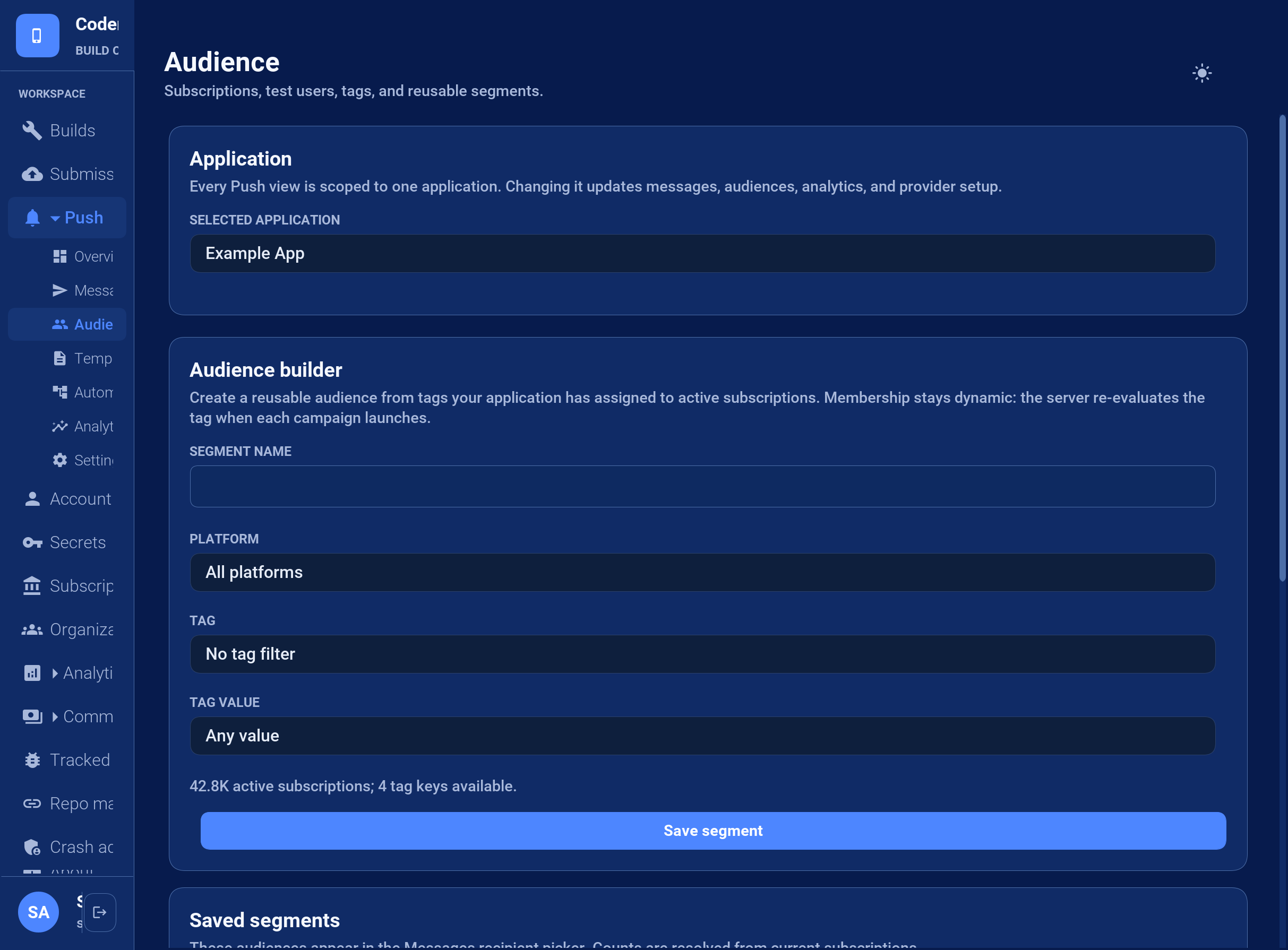
Segments are evaluated at send time. Changing a subscription’s tags changes future membership without editing the segment. A count is an estimate of the current state; registrations, subscription removals, and tag updates can change it before admission.
For a safe rollout, tag internal devices with testUser=true, create a test-user segment, and send the message there first. Create the production segment only from server-controlled tags.
Send a message from the Console
Open Push > Messages and complete the three numbered sections:
Audience: choose All subscribed devices or a saved segment. The Console displays the current recipient estimate. Individual provider tokens aren’t entered in this workflow.
Message: enter a notification title and message. A visible notification requires message text. For a silent notification, enable Silent / data-only notification and provide an additional-data key and value. The Console builds valid JSON; operators don’t paste JSON into the primary composer.
Delivery: choose how long providers may retain an undelivered message. Console messages use safe cross-platform defaults and enter the durable queue immediately.
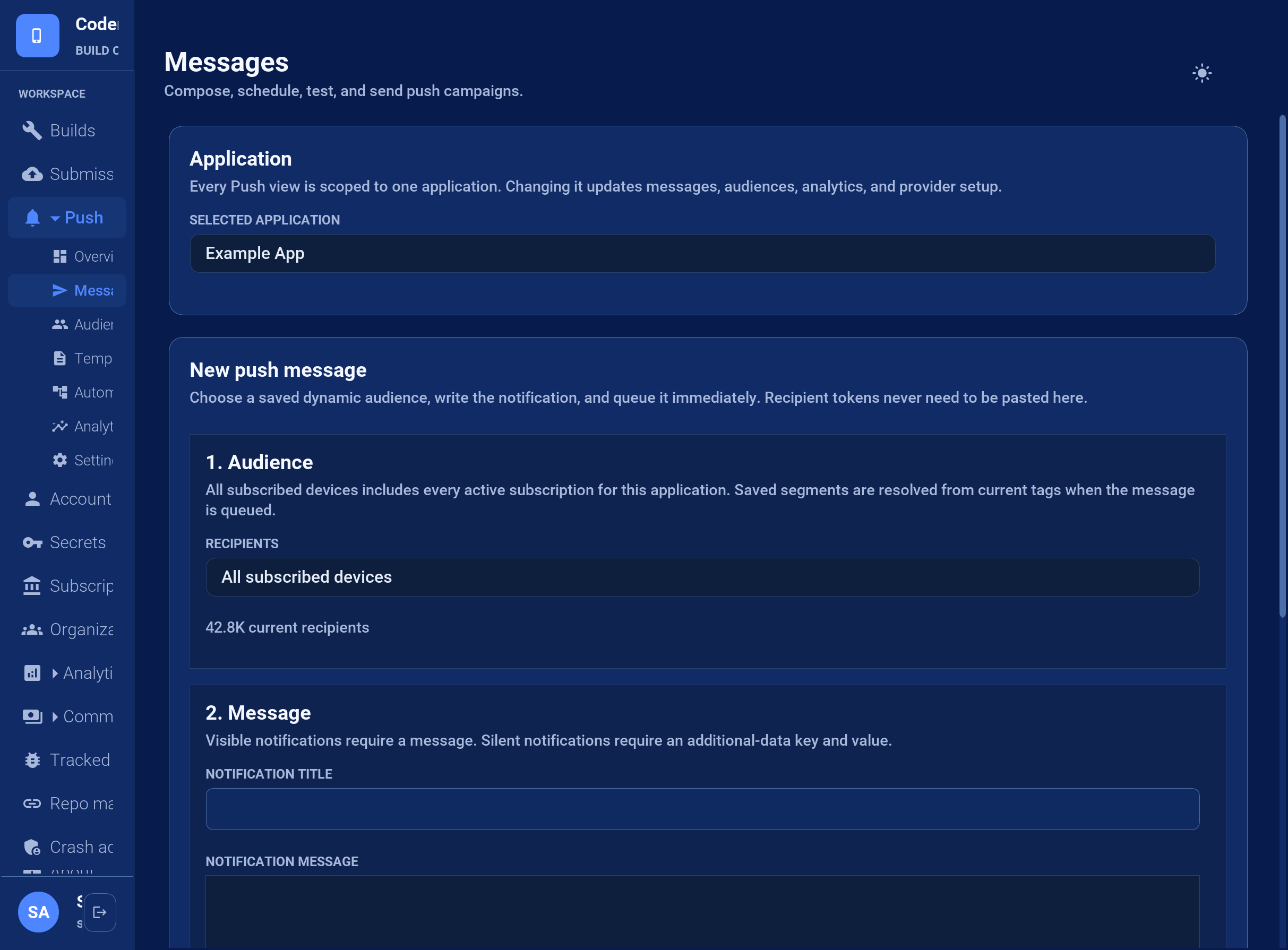
Select Queue message only after checking the audience name and estimate. BuildCloud creates the campaign, resolves the segment, and admits the recipients to the durable delivery queue. The provider may accept a notification that the device never displays, so inspect Push > Analytics for provider acceptance and failures without treating acceptance as device delivery.
Event automations
An automation is an enabled rule containing trigger.event, a schema-3 message, an optional audience, and an optional delaySeconds. If no audience is stored in the rule, the event must identify an externalUserId or installationId. Text fields in the message can insert event properties with ${event.propertyName}.
{
  "enabled": true,
  "trigger": {"event": "order.ready"},
  "delaySeconds": 0,
  "message": {
    "schema": 3,
    "title": "Order update",
    "body": "Order ${event.orderId} is ready"
  }
}
Your server triggers enabled rules with POST /api/v3/push/apps/{appId}/events using a push-scoped API key:
{
  "name": "order.ready",
  "externalUserId": "customer-4815",
  "properties": {"orderId": "4815"}
}
Immediate matches enter the durable delivery queue. Delayed matches become scheduled campaigns, so restarts don’t lose them. Automations are intentionally push rules, not a general-purpose customer journey or analytics product.
Widgets and live surfaces
A push can publish widget content or update a live activity before the regular listener receives the message. The surface object uses one of these operations:
{
  "schema": 3,
  "silent": true,
  "surface": {
    "operation": "widget",
    "kind": "order-status",
    "timeline": "{...serialized widget timeline...}"
  }
}
For a live activity use live-update or live-end with id, serialized state, and optional dismissImmediately. Unsupported surfaces are ignored. A surface command runs when the Codename One runtime receives the envelope. On platforms that don’t start application code for a background push, the native queue preserves the command and applies it on the next start or resume. Applications must therefore refresh stale surface state during foreground activation too.
Use an application-owned push server
A custom server is a low-level alternative to managed push; it doesn’t reuse the BuildCloud protocol at a different endpoint. A CN1Lib implements PushTransport around the private provider’s native SDK. It obtains native registration material, reports token rotation, and forwards incoming data as the canonical schema-3 JSON envelope. A matching PushRegistrationSink stores and removes the subscription on your server:
// companyTransport is supplied by the native CN1Lib.
// listener is the application's normal, non-null PushListener.
PushClient client = PushClient.builder("private-app-id")
        .transport(companyTransport)
        .registrationSink(new PushRegistrationSink() {
            @Override
            public void registered(PushSubscription value) {
                Log.p("Send the subscription to the company server");
            }

            @Override
            public void unregistered(PushSubscription value) {
                Log.p("Remove the subscription from the company server");
            }
        })
        .listener(listener)
        .build();
When a PushTransport implementation is present, PushClient never contacts BuildCloud. Your implementation owns these responsibilities:
getId()returns a stable provider ID that your server understands.isSupported()checks whether the SDK can operate on this device.register()invokesCallback.registered()with aPushSubscription, then reports later token rotations through the same callback.unregister()removes the provider subscription and invokesCallback.unregistered()when complete.Incoming native messages call
Callback.message()with one complete schema-3 envelope. Don’t call the application listener directly and don’t invent a second payload format.Registration or transport failures call
Callback.failed(). The callback is thread-safe;PushClientmoves application-facing callbacks to the EDT.
The registration sink should asynchronously insert or update the subscription by installationId on your server and replace its token when it rotates. The server then sends through your provider’s native API. It must preserve the schema-3 envelope so the same PushListener, deep-link handling, and surface commands work in managed and custom-server modes.
The application still follows the normal lifecycle: retain one client, call register() from start(), and reserve unregister() for an actual opt-out. This custom integration doesn’t introduce reflection or automatic listener discovery.
Testing delivery behavior
Hosted CI has no installed application, OS push daemon, permission state, or physical device, so it can’t prove provider-to-device delivery. Codename One tests at the lowest controllable boundary instead. PushClientTransportTest injects a fake native transport and covers:
foreground, background, force-stopped, and cold-start delivery;
notification tap, action, dismissal, and deep-link routing;
permission granted, denied, and later changed in system settings;
token rotation, reinstall, expiry, logout, and multiple installations per user;
silent delivery and simulated constrained-state replay;
collapse keys, TTL expiry, Unicode, maximum payloads, images, and provider errors;
queued widget and live-activity updates replayed at the native/runtime seam;
retry idempotency and dead-letter behavior.
The JavaScript contract executes the real service-worker source with mocked browser clients and notification APIs. BuildCloud has a separate local suite using mocked provider HTTP responses for compatibility translation, credentials, durable queue behavior, retries, and automations. Physical-device sends are optional release diagnostics rather than a CI or nightly requirement. Provider acceptance isn’t proof of device delivery.